Tuesday, 17 March 2015

Q 11) Interfaces


Interfaces : 

  •  Interfaces are pure abstract classes (100 %) and are similar to classes.
  • An interface cannot be instantiated, meaning you cannot create an instance of an interface.
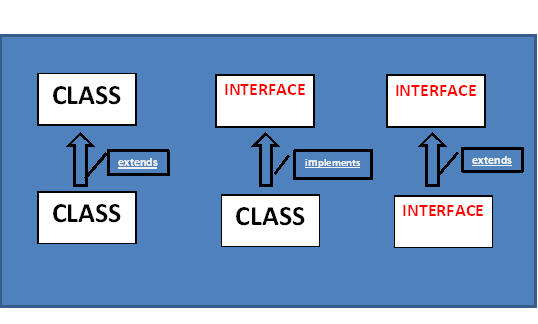
  • It can be implemented by a class or extended by another interface.
  • Interfaces are used to achieve complete abstraction in java.


Syntax :
interface interface_name {

            }

Example of interface :

public interface DriveCar {
          void turnLeft();
          void turnRight();
void moveBack();
void accelerate();
}

The above is equivalent to :
public interface DriveCar {
                   public abstract void turnLeft();
                   public abstract void turnRight();
          public abstract void moveBack();
          public abstract void accelerate();
}


Rules for using Interface:-

  • Methods inside interface must be static, final, native or strict fp.
  • All variable declared in interface are implicitly public, static and final (Constants).
  • All methods are public and abstract by default, Even if you don’t use the keywords (Therefore 100 % abstract).
  • Interface cannot implement a class.
  • Interface can extend one or more interfaces.
  • Java doesn’t support multiple inheritance, but a class can implement more than one interface.
  •  Interface must implement all the methods in its class.


Example program 1 :

package org.javanoobs.interfaces;

public interface Movable {
    
     void move();

}


package org.javanoobs.interfaces;

public class Vehicle implements Movable{
    
     public void move(){
          
           int avgSpeed = 40;
           System.out.println(" Average speed is :  " +avgSpeed);
     }
    
     public static void main(String[] args) {
          
           Vehicle vh = new Vehicle();
           vh.move();
     }

}

Output :
Average speed is :  40

Example program 2:

package org.javanoobs.interfaceinheritance;

// This is the first interface.
public interface Movable {
    
     boolean isMovable();

}


package org.javanoobs.interfaceinheritance;

// this is the second interface.
public interface Rollable {
    
     boolean isRollable();

}


package org.javanoobs.interfaceinheritance;

public class Tyre implements Movable,Rollable {
    
     int width;
    
     public boolean isMovable(){
          
           System.out.println(" This is inside of isMovable method... ");
          
           return true;
     }
    
     public boolean isRollable(){
          
           System.out.println(" This is inside of isRoallable method ");
           return true;
     }
    
     public static void main(String[] args) {
          
           Tyre tr = new Tyre();
           System.out.println(tr.isMovable());
           System.out.println(tr.isRollable());
          
          
     }

}


Output :
This is inside of isMovable method...
true
 This is inside of isRoallable method
true

Q 012) Abstract Class VS Interface


INTERFACE
ABSTRACT CLASS
01)
When :
When the implementation is unknown. And we only have SRS, Then Interface is a suitable choice.
When :
If we know the implementation partially then we should opt for abstract class.
02 )
Method:
Every method is always public and abstract weather we declare the keywords or not.
Method:
Every method need not be public. In addition to abstract methods we can declare concrete methods in Abstract Class as well.
03)
Method Modifiers :
Allowed: Static , final , native and strict fp.
Method Modifiers :
No restrictions on abstract class methods.


INTERFACE
ABSTRACT CLASS
04)
Variables:
Every variable in interface is public , static and final
 ( CONSTANTS )
Variables:
No restrictions.
05 )
Variable Modifiers :
Not Allowed : private,  protected, transient, volatile…
Variable Modifiers :
No restrictions.
06)
Variable Initialization :
Variable should be initialized at the time of declaration or will result in error.
Variable Initialization :
No restriction.


07)
Instance/ Static Block :
Using of Instance and static blocks will result in error.
Instance/ Static Block :
We can use both instance a static block.
08)
Constructors  :
Cannot use Constructors.
Constructors  :
We can declare Constructors which will be executed at the time of child class object creation.
09)
 Keyword :
Implements
Keyword :
 “ Extends


Monday, 16 March 2015

Q1 What Is Java Why Java ?


Java is a programming language , it is a development environment.

·       Programming Language.
·       Development Environment.

Some of the key features that makes java powerful and robust are:

·       It has built in support for : multithreading ,Socket communication  & Memory Management (garbage collection ). 
·       It is Object Oriented.
     ·       It supports :

  1.    web based applications (applets, servlets, jsp..).
  2.    Distributed applications (Socketds, Rmi, ejb,….).
  3.    Network Protocols (http, Jrmpets..)with the help of    extensive standard API’s(Application Program                       Interface).           
                              
Features To Remember :


  1. Simple.
  2. Object-Oriented.
  3. Platform independent.
  4. Secured.
  5. Robust.
  6. Architecture neutral.
  7. Portable.
  8. Dynamic.
  9. Interpreted.
  10. High Performance.
  11. Multithreaded.
  12. Distributed.

Q 02) - What Is The Difference Between c++ and Java ?


  •  Java does not support the concept of Pointers. Pointers are inherently tricky and troublesome to use.
  • Java does not support multiple inheritance because it causes more problem s than it solves. Instead Java supports multiple interface inheritance.
  •  Java does not use structures and unions because the traditional data structures are implemented as an object oriented framework( Java Collection Framework ).
  •  All the codes are encapsulated with in a class there fore java does not have a global variables or functions.
  • C++ requires explicit memory management, while java includes automatic garbage collection.

Q 03) Difference Between Java Platform And Other Platforms ?


           A java platform is a software only platform. It runs on other hardware based platforms like Unix, Linux, windows nt ,….etc.

Java platform has two components  :
  •        JVM ( Java Virtual Machine ) : It is a software that cam be ported  onto various hardware platforms. And converts Byte codes into  machine level language.   
  •       Java API  : Application Program Interface.

Q 04) What Is Jvm Explain With a Diagram ?


Java Virtual Machine (JVM) :

     A JVM converts bytecode into machine level language.
or

    A jvm is a runtime environment used to run bytecode generated form the source code without taking the help of the operating system.


1)    Class loader : Loads the class files
2)    Class Method Area : All the methods and method data are stored.
3)    HEAP: All the OBJECTS are stored here.
4)    STACK: Java stack stores frames, it holds local variables and partial results and plays a part in method invocation and return values.
5)    PC (Program Counter )Register: Contains address of JVM instructions currently being executed.
6)    Native Method Stack : All native methods used in application.
7)    Execution Engine : 
·       A Virtual processor
·       Interpreter ( Reads bytecode streams then executed instruction )
·       JIT Complier (Just In Time)

JIT Compiler : A JIT (Just In Time) Compiler is used to improve the performance.

A JIT – Compiler compiles  parts of byte code that have similar functionality at the same time, and hence reduces the time needed.

Q 05) Garbage Collection Converted ?


 Garbage collection :

  Freeing up the required memory to make a program more “ Robust” .
or
   Destroy Useless objects.


   Garbage collection is an assistance provided in java and by using this assistance , the chances of failing a java program with memory problems is very very low.